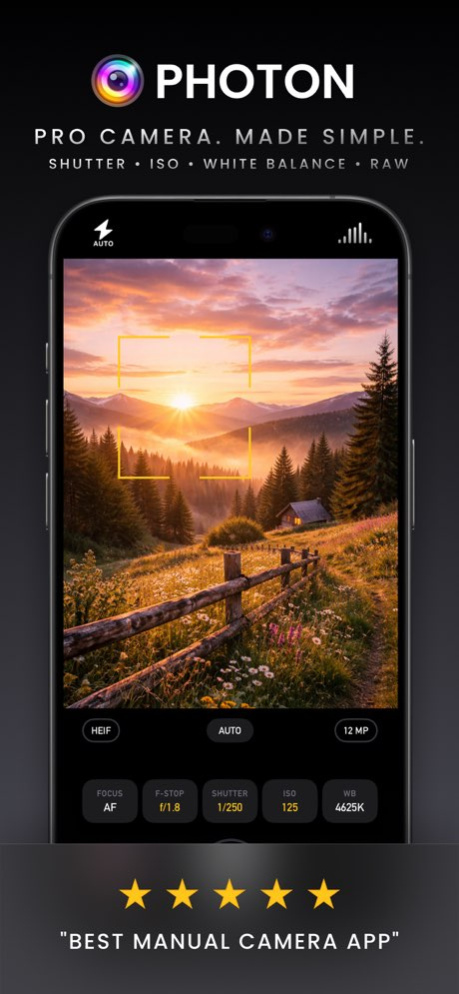
About Photon Camera
Turn your iPhone and iPad into a powerful photography tool with Photon Camera. Ideal for passionate enthusiasts and those venturing into professional photography, Photon Camera ensures DSLR-quality captures with every...
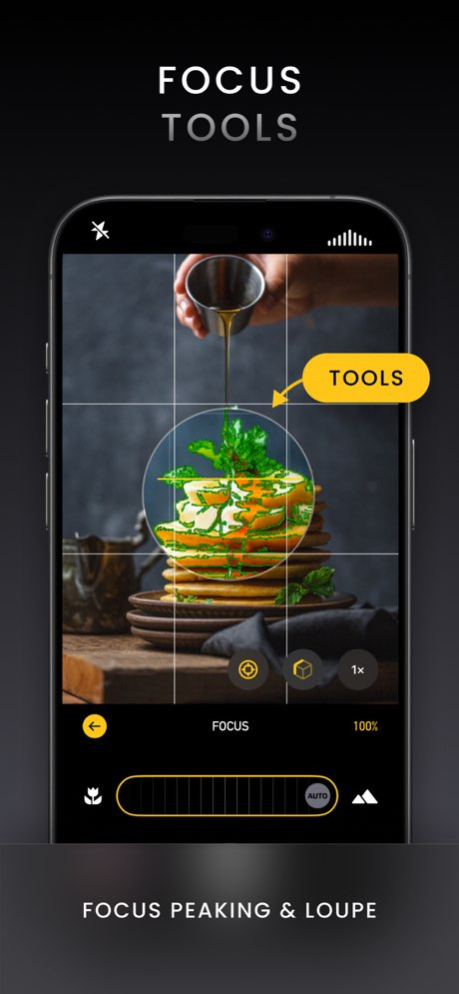
Turn your iPhone and iPad into a powerful photography tool with Photon Camera. Ideal for passionate enthusiasts and those venturing into professional photography, Photon Camera ensures DSLR-quality captures with every tap. DSLR-Quality Photos with Professional Features Photon Camera brings DSLR-quality photos to your iPhone and iPad with professional features for full manual control. Adjust focus, ISO, shutter speed, white balance, and, on iPhone 18 Pro, aperture, to capture unbelievable images. The ultimate camera app for creative photographers. Minimalist, Intuitive Design Ditch the clutter and focus on your shot. Photon sports a sleek, minimalist design that puts essential features at your fingertips. Clearly labeled, high-contrast, easy-to-tap controls give you instant access to focus, exposure, and white balance, so you can capture the perfect shot every time. Powerful, Professional Tools Experience the best of professional photography on your iPhone and iPad. Photon Camera equips you with robust tools such as live exposure, histogram, level, a focus loupe, timer, exposure clipping, and focus peaking, ensuring you capture exactly what you want. A Native iPad Camera Photon is built for iPad. All your pro tools are there: manual controls, histogram, level, focus peaking, and loupe, with layouts designed for the larger screen. A dedicated editing sidebar gives your photos more room while keeping adjustments close at hand. Smart, Precise Editing Edit with the same precision you shoot with. Smart Selection lets you tap an object and adjust it independently: Photon detects its edges, so you can brighten your subject, cool the background, or give each its own look. Blur and Sharpen tools let you soften a background or bring out detail, across the whole image or just a selection. On iPad, a dedicated editing sidebar gives your photos more room while keeping adjustments close at hand. Smart Selection requires iOS 27. Take Creative Control with Process Control Go beyond the basics of RAW photography with Process Control. This innovative tool lets you select the level of AI processing applied to your photos on a scale from 0% to 100%. Whether you prefer unprocessed RAW purity, fully enhanced photos, or something in between, Process Control ensures your creative vision comes to life. Process Control photos open directly in the editor, ready for finishing touches. Seamless Image Browser Relive your memories in a swipe with our easy-to-use image browser. Browse through your recent captures, get detailed insights about each photo, move smoothly into the editor, and share or delete with a single tap. Why Choose Photon? Simple, clutter-free interface designed for focused photography A native camera experience on iPad Capture in any format you like, including True RAW, ProRAW, HEIF, JPEG, and JPEG XL (iPhone 16 Pro and later). Or combine RAW and non-RAW formats. Instant access to manual controls, including Best-on-iPhone focus tools and manual aperture on iPhone 18 Pro, also through Camera Control Smart Selection, Blur, and Sharpen for precise, targeted edits Professional tools like live exposure, histogram, level, focus peaking, loupe, timer, exposure clipping, reliable RAW burst shooting, and external storage (iPhone 15 Pro and later) A user-friendly image browser that doubles as your digital photo album Photon Studio companion app that shows a live preview as you shoot your photos! Free for all Photon Pro users. Join the community of aspiring photographers taking their iPhone and iPad photography to the next level with Photon. It is not just a camera; it is a tool to unleash your creative vision. Download now and start capturing the world around you in stunning detail. You can review terms of use at https://photon.cam/terms/.
Version History Photon 7.0 is now a native iPad camera, supports iOS 27 and iPhone 18 Pro! Photon is now a native iPad camera. All your pro tools are there: manual controls, histogram, level, focus peaking, and loupe, with layouts designed for the larger screen. A dedicated editing sidebar gives your photos more room while keeping adjustments close at hand. Smart Selection lets you adjust one part of a photograph independently. In the adjustments panel, turn on selection mode and tap an object. Photon detects the object's edges and highlights it, so your adjustments affect only that region. Invert the selection to work on everything outside it instead. Brighten your subject, cool the background, or give each its own look. Requires iOS 27. New Blur and Sharpen tools give you more ways to shape your photos. Apply them to the whole image, or combine them with Smart Selection to soften a background or bring out detail in your subject. And there is more: * Support for iPhone 18 Pro and Pro Max. * Manual aperture control on iPhone 18 Pro and Pro Max, in Photon and through Camera Control. * Refreshed manual controls with clear labels, improved contrast, and easier-to-tap buttons. * Smoother transitions between the photo browser and editor. * Clearer explanations when the camera is interrupted, with automatic recovery when it becomes available again. * More reliable RAW burst shooting, with reduced memory use during sustained bursts. * Photos taken with Process Control now open directly in the editor. We would love to hear how Photon feels on iPad. Use the in-app bug reporter or email us at support@photon.cam. If you are enjoying Photon, a quick rating on the App Store helps us a lot. The Photon Team 7.0 Sep 19 This update is all about the Quick Editor, with faster improvements and more control in every edit. Auto enhance Tap the magic wand and Photon instantly analyzes your photo to correct exposure, contrast, color cast, and saturation. When the subject is clear, it can also suggest a crop. Each change is applied directly to the matching sliders, so you can fine-tune the look or undo the entire Auto result with a single tap. Undo & redo New buttons in the navigation bar make it easy to step back and forward through your edits. A slider drag counts as one step, and the preview crossfades smoothly as you move through your history, so you always know exactly what changed. RAW Mix For images that include both RAW and processed versions, use a new slider to blend them. Dial in the exact balance between RAW flexibility and processed polish, then keep your chosen mix because it’s saved with the edit. Polish We refined the toolbar for a cleaner workflow, kept Auto within reach for quick re-tries, added subtle haptic feedback, and expanded the editing view on iPhone when in portrait for a more comfortable, spacious experience. 6.7.1 Jul 18 This update is all about the Quick Editor, with faster improvements and more control in every edit. Auto enhance Tap the magic wand and Photon instantly analyzes your photo to correct exposure, contrast, color cast, and saturation. When the subject is clear, it can also suggest a crop. Each change is applied directly to the matching sliders, so you can fine-tune the look or undo the entire Auto result with a single tap. Undo & redo New buttons in the navigation bar make it easy to step back and forward through your edits. A slider drag counts as one step, and the preview crossfades smoothly as you move through your history, so you always know exactly what changed. RAW Mix For images that include both RAW and processed versions, use a new slider to blend them. Dial in the exact balance between RAW flexibility and processed polish, then keep your chosen mix because it’s saved with the edit. Polish We refined the toolbar for a cleaner workflow, kept Auto within reach for quick re-tries, added subtle haptic feedback, and expanded the editing view on iPhone when in portrait for a more comfortable, spacious experience. 6.7 Jul 17 Photon 6.6 adds remote shutter control to Apple Watch. Now you can open Photon on your iPhone, frame your photo, then use the Apple Watch shutter button to capture without touching your iPhone. On the Watch, you will see the camera readiness status, connection stays in sync with the iPhone camera, and a dedicated Photon trigger button is built for the smaller Apple Watch screen. Timer mode is supported as well. If you set a timer on iPhone, pressing the Watch shutter starts the countdown instead of taking the photo right away. During the countdown, tap again to cancel, just like the iPhone shutter button. Have feedback or suggestions? Use the in-app bug reporter to contact us. We are here to help. 6.6 May 5 Photon 6.5 is here: meet Quick Editor. A fast, streamlined way to fine-tune photos without leaving Photon. Edit right where you shoot, faster than ever. * Real-time edits powered by our new rendering engine * Adjust contrast, vignette, filters, and more, all with live thumbnail previews * Use the crop tool, it is fast and precise * Non-destructive edits with reliable, atomic saving * Instant thumbnail refresh so your library stays in sync Darkroom integration: If Darkroom is installed, photos open there by default, long-press to jump straight into Quick Editor. Localized in English, Spanish, German, and Simplified Chinese, so more photographers can use Photon in their language. 6.5 Feb 26 In this update, we've addressed a variety of localization issues to enhance your experience, ensuring clearer content. Enjoy a more intuitive interaction with improved language support. 6.0.5 Jan 15 Photon 6.0.4 includes some minor bug fixes, while Photon 6.0 introduced a more modern look with Liquid Glass styling, broader support for the newest iPhones (including 48MP capture on 2025 devices), and a smoother, more reliable camera experience with improved rotation/orientation handling. 6.0.4 Jan 7 Photon 6.0.3 includes some minor bug fixes, while Photon 6.0 introduced a more modern look with Liquid Glass styling, broader support for the newest iPhones (including 48MP capture on 2025 devices), and a smoother, more reliable camera experience with improved rotation/orientation handling. 6.0.3 12/19/2025 Photon 6.0.2 fixes an issue where the front camera could not be selected on iPhone 17 Pro, and resolves a related bug that caused the viewfinder to display with incorrect orientation when using the front camera on that device. 6.0.2 10/29/2025 iOS 26 & Liquid Glass are here. This version introduces support for iOS 26 ensuring seamless performance with Apple’s new Liquid Glass interface. This update brings full compatibility with iOS 26’s system behaviors. Whether you're shooting in Manual, Express, or Process Control mode, Photon continues to deliver professional-grade results with maximum efficiency and precision. 6.0.1 09/24/2025 Liquid Glass is here. This version introduces support for iOS 26 and the latest iPhone 17, 17 Pro, and iPhone Air models, ensuring seamless performance with Apple’s new Liquid Glass interface. This update brings full compatibility with iOS 26’s system behaviors. Whether you're shooting in Manual, Express, or Process Control mode, Photon continues to deliver professional-grade results with maximum efficiency and precision on the newest devices. 6.0 09/21/2025 This release provides support for iPhone 17, iPhone 17 Pro, iPhone 17 Pro Max and iPhone Air. 5.6 09/18/2025 Photon 5.5 introduces seamless integration with Darkroom, making it easier than ever to edit your photos with pro-level tools. Now, after capturing an image in Photon, you can send it directly to Darkroom for instant editing—no exporting required. Whether you're working with RAW or not, this new workflow streamlines your process and lets you get from shoot to finished photo faster. As always, thank you for helping shape Photon with your feedback, we are excited to keep building the tools you need! 5.5 08/27/2025 Photon 5.4 supercharges your workflow with a completely redesigned photo browser that packs a full-screen, drag-down grid, thumbnail scrubbing, and instant swipe-to-dismiss. You’ll see at-a-glance badges (and optional toggle) for any photo captured in Process Control mode. Our revision tracking process ensures only edited images reload, keeping everything up to date without stuttering. We’ve squashed a stack of pesky landscape, alignment, and gesture bugs. And if that wasn't enough, we also tightened the UI for a cleaner, distraction-free experience. 5.4 08/07/2025 Bug fixes and polished translations that feel native for a smoother experience in every language. 5.3.6 07/23/2025 We've been hard at work refining your experience with this latest update. Behind the scenes, we've resolved several issues that were affecting stability and optimized core functionality to make everything run more smoothly. 5.3.5 07/08/2025 We've made some small yet impactful improvements to enhance your experience with Photon. Thanks to your feedback, every update makes Photon more reliable and user-friendly. 5.3.4 06/20/2025 We've made some small yet impactful improvements to enhance your experience with Photon. Thanks to your feedback, every update makes Photon more reliable and user-friendly. 5.3.3 06/16/2025 Small Fixes & Improvements. Thank you for helping us make Photon better with every release. 5.3.2 06/12/2025 Small Fixes & Improvements: Minor histogram display issue resolved, fix crash when app is backgrounded. Thank you for helping us make it better with every release. 5.3.1 06/06/2025 Organize your shots your way. With version 5.3, Photon now lets you choose exactly where your photos are saved. Select any existing album in the Photos app—or create a new one on the fly—directly from within Photon’s interface. As always, your feedback continues to shape Photon—thank you for helping us make it better with every release. 5.3 05/26/2025 We have made some tweaks to the settings menu. In version 5.2 we Introduced Express Mode, a brand-new way to capture stunning photos with ease! Express Mode simplifies your shooting experience by replacing complex manual controls with intuitive options. Lock or unlock focus and white balance with a tap, adjust brightness effortlessly using a single EV wheel, and enjoy zoom functionality not available in Manual Mode. By streamlining the interface and skipping advanced tools like RAW, focus peaking, and exposure clipping, Express Mode ensures you can focus on the moment without being overwhelmed by settings. It’s photography, made simple. We’ve also resolved an issue affecting the touch area of the return buttons on the shutter speed and ISO toolbars when using the app in landscape mode. This fix improves accuracy and responsiveness, ensuring a smoother experience for all users. As always, thank you for your feedback and support—it helps us continue refining Photon Camera for you! 5.2.3 04/21/2025 We have made some tweaks to the settings menu. In version 5.2 we Introduced Express Mode, a brand-new way to capture stunning photos with ease! Express Mode simplifies your shooting experience by replacing complex manual controls with intuitive options. Lock or unlock focus and white balance with a tap, adjust brightness effortlessly using a single EV wheel, and enjoy zoom functionality not available in Manual Mode. By streamlining the interface and skipping advanced tools like RAW, focus peaking, and exposure clipping, Express Mode ensures you can focus on the moment without being overwhelmed by settings. It’s photography, made simple. We’ve also resolved an issue affecting the touch area of the return buttons on the shutter speed and ISO toolbars when using the app in landscape mode. This fix improves accuracy and responsiveness, ensuring a smoother experience for all users. As always, thank you for your feedback and support—it helps us continue refining Photon Camera for you! 5.2.2 04/18/2025 In version 5.2.1, we’ve made some subtle yet impactful UI improvements to enhance your experience. Also, in 5.2, we Introduced Express Mode, a brand-new way to capture stunning photos with ease! Express Mode simplifies your shooting experience by replacing complex manual controls with intuitive options. Lock or unlock focus and white balance with a tap, adjust brightness effortlessly using a single EV wheel, and enjoy zoom functionality not available in Manual Mode. By streamlining the interface and skipping advanced tools like RAW, focus peaking, and exposure clipping, Express Mode ensures you can focus on the moment without being overwhelmed by settings. It’s photography, made simple. As always, thank you for your feedback and support—it helps us continue refining Photon Camera for you! 5.2.1 03/17/2025 Introducing Express Mode, a brand-new way to capture stunning photos with ease! Express Mode simplifies your shooting experience by replacing complex manual controls with intuitive options. Lock or unlock focus and white balance with a tap, adjust brightness effortlessly using a single EV wheel, and enjoy zoom functionality not available in Manual Mode. By streamlining the interface and skipping advanced tools like RAW, focus peaking, and exposure clipping, Express Mode ensures you can focus on the moment without being overwhelmed by settings. It’s photography, made simple. We’ve also resolved an issue affecting the touch area of the return buttons on the shutter speed and ISO toolbars when using the app in landscape mode. This fix improves accuracy and responsiveness, ensuring a smoother experience for all users. As always, thank you for your feedback and support—it helps us continue refining Photon Camera for you! 5.2 01/28/2025
Previous Versions
Here you can find the changelog of Photon Camera since it was posted on our website on 2023-08-03 15:55:16.
The latest version is 7.0 and it was updated on 2026-10-07 07:18:38. See below the changes in each version.
Photon Camera version 7.0
Updated At: 2026-10-06
Changes: Version History Photon 7.0 is now a native iPad camera, supports iOS 27 and iPhone 18 Pro!
Photon is now a native iPad camera. All your pro tools are there: manual controls, histogram, level, focus peaking, and loupe, with layouts designed for the larger screen. A dedicated editing sidebar gives your photos more room while keeping adjustments close at hand.
Smart Selection lets you adjust one part of a photograph independently. In the adjustments panel, turn on selection mode and tap an object. Photon detects the object's edges and highlights it, so your adjustments affect only that region. Invert the selection to work on everything outside it instead. Brighten your subject, cool the background, or give each its own look. Requires iOS 27.
New Blur and Sharpen tools give you more ways to shape your photos. Apply them to the whole image, or combine them with Smart Selection to soften a background or bring out detail in your subject.
And there is more:
* Support for iPhone 18 Pro and Pro Max.
* Manual aperture control on iPhone 18 Pro and Pro Max, in Photon and through Camera Control.
* Refreshed manual controls with clear labels, improved contrast, and easier-to-tap buttons.
* Smoother transitions between the photo browser and editor.
* Clearer explanations when the camera is interrupted, with automatic recovery when it becomes available again.
* More reliable RAW burst shooting, with reduced memory use during sustained bursts.
* Photos taken with Process Control now open directly in the editor.
We would love to hear how Photon feels on iPad. Use the in-app bug reporter or email us at support@photon.cam. If you are enjoying Photon, a quick rating on the App Store helps us a lot.
The Photon Team 7.0 Sep 19 This update is all about the Quick Editor, with faster improvements and more control in every edit.
Auto enhance
Tap the magic wand and Photon instantly analyzes your photo to correct exposure, contrast, color cast, and saturation. When the subject is clear, it can also suggest a crop. Each change is applied directly to the matching sliders, so you can fine-tune the look or undo the entire Auto result with a single tap.
Undo & redo
New buttons in the navigation bar make it easy to step back and forward through your edits. A slider drag counts as one step, and the preview crossfades smoothly as you move through your history, so you always know exactly what changed.
RAW Mix
For images that include both RAW and processed versions, use a new slider to blend them. Dial in the exact balance between RAW flexibility and processed polish, then keep your chosen mix because it’s saved with the edit.
Polish
We refined the toolbar for a cleaner workflow, kept Auto within reach for quick re-tries, added subtle haptic feedback, and expanded the editing view on iPhone when in portrait for a more comfortable, spacious experience. 6.7.1 Jul 18 This update is all about the Quick Editor, with faster improvements and more control in every edit.
Auto enhance
Tap the magic wand and Photon instantly analyzes your photo to correct exposure, contrast, color cast, and saturation. When the subject is clear, it can also suggest a crop. Each change is applied directly to the matching sliders, so you can fine-tune the look or undo the entire Auto result with a single tap.
Undo & redo
New buttons in the navigation bar make it easy to step back and forward through your edits. A slider drag counts as one step, and the preview crossfades smoothly as you move through your history, so you always know exactly what changed.
RAW Mix
For images that include both RAW and processed versions, use a new slider to blend them. Dial in the exact balance between RAW flexibility and processed polish, then keep your chosen mix because it’s saved with the edit.
Polish
We refined the toolbar for a cleaner workflow, kept Auto within reach for quick re-tries, added subtle haptic feedback, and expanded the editing view on iPhone when in portrait for a more comfortable, spacious experience. 6.7 Jul 17 Photon 6.6 adds remote shutter control to Apple Watch. Now you can open Photon on your iPhone, frame your photo, then use the Apple Watch shutter button to capture without touching your iPhone.
On the Watch, you will see the camera readiness status, connection stays in sync with the iPhone camera, and a dedicated Photon trigger button is built for the smaller Apple Watch screen.
Timer mode is supported as well. If you set a timer on iPhone, pressing the Watch shutter starts the countdown instead of taking the photo right away. During the countdown, tap again to cancel, just like the iPhone shutter button.
Have feedback or suggestions? Use the in-app bug reporter to contact us. We are here to help. 6.6 May 5 Photon 6.5 is here: meet Quick Editor. A fast, streamlined way to fine-tune photos without leaving Photon. Edit right where you shoot, faster than ever.
* Real-time edits powered by our new rendering engine
* Adjust contrast, vignette, filters, and more, all with live thumbnail previews
* Use the crop tool, it is fast and precise
* Non-destructive edits with reliable, atomic saving
* Instant thumbnail refresh so your library stays in sync
Darkroom integration: If Darkroom is installed, photos open there by default, long-press to jump straight into Quick Editor.
Localized in English, Spanish, German, and Simplified Chinese, so more photographers can use Photon in their language. 6.5 Feb 26 In this update, we've addressed a variety of localization issues to enhance your experience, ensuring clearer content. Enjoy a more intuitive interaction with improved language support. 6.0.5 Jan 15 Photon 6.0.4 includes some minor bug fixes, while Photon 6.0 introduced a more modern look with Liquid Glass styling, broader support for the newest iPhones (including 48MP capture on 2025 devices), and a smoother, more reliable camera experience with improved rotation/orientation handling. 6.0.4 Jan 7 Photon 6.0.3 includes some minor bug fixes, while Photon 6.0 introduced a more modern look with Liquid Glass styling, broader support for the newest iPhones (including 48MP capture on 2025 devices), and a smoother, more reliable camera experience with improved rotation/orientation handling. 6.0.3 12/19/2025 Photon 6.0.2 fixes an issue where the front camera could not be selected on iPhone 17 Pro, and resolves a related bug that caused the viewfinder to display with incorrect orientation when using the front camera on that device. 6.0.2 10/29/2025 iOS 26 & Liquid Glass are here. This version introduces support for iOS 26 ensuring seamless performance with Apple’s new Liquid Glass interface. This update brings full compatibility with iOS 26’s system behaviors. Whether you're shooting in Manual, Express, or Process Control mode, Photon continues to deliver professional-grade results with maximum efficiency and precision. 6.0.1 09/24/2025 Liquid Glass is here. This version introduces support for iOS 26 and the latest iPhone 17, 17 Pro, and iPhone Air models, ensuring seamless performance with Apple’s new Liquid Glass interface. This update brings full compatibility with iOS 26’s system behaviors. Whether you're shooting in Manual, Express, or Process Control mode, Photon continues to deliver professional-grade results with maximum efficiency and precision on the newest devices. 6.0 09/21/2025 This release provides support for iPhone 17, iPhone 17 Pro, iPhone 17 Pro Max and iPhone Air. 5.6 09/18/2025 Photon 5.5 introduces seamless integration with Darkroom, making it easier than ever to edit your photos with pro-level tools. Now, after capturing an image in Photon, you can send it directly to Darkroom for instant editing—no exporting required. Whether you're working with RAW or not, this new workflow streamlines your process and lets you get from shoot to finished photo faster.
As always, thank you for helping shape Photon with your feedback, we are excited to keep building the tools you need! 5.5 08/27/2025 Photon 5.4 supercharges your workflow with a completely redesigned photo browser that packs a full-screen, drag-down grid, thumbnail scrubbing, and instant swipe-to-dismiss. You’ll see at-a-glance badges (and optional toggle) for any photo captured in Process Control mode. Our revision tracking process ensures only edited images reload, keeping everything up to date without stuttering.
We’ve squashed a stack of pesky landscape, alignment, and gesture bugs. And if that wasn't enough, we also tightened the UI for a cleaner, distraction-free experience. 5.4 08/07/2025 Bug fixes and polished translations that feel native for a smoother experience in every language. 5.3.6 07/23/2025 We've been hard at work refining your experience with this latest update. Behind the scenes, we've resolved several issues that were affecting stability and optimized core functionality to make everything run more smoothly. 5.3.5 07/08/2025 We've made some small yet impactful improvements to enhance your experience with Photon. Thanks to your feedback, every update makes Photon more reliable and user-friendly. 5.3.4 06/20/2025 We've made some small yet impactful improvements to enhance your experience with Photon. Thanks to your feedback, every update makes Photon more reliable and user-friendly. 5.3.3 06/16/2025 Small Fixes & Improvements. Thank you for helping us make Photon better with every release. 5.3.2 06/12/2025 Small Fixes & Improvements: Minor histogram display issue resolved, fix crash when app is backgrounded.
Thank you for helping us make it better with every release. 5.3.1 06/06/2025 Organize your shots your way. With version 5.3, Photon now lets you choose exactly where your photos are saved. Select any existing album in the Photos app—or create a new one on the fly—directly from within Photon’s interface.
As always, your feedback continues to shape Photon—thank you for helping us make it better with every release. 5.3 05/26/2025 We have made some tweaks to the settings menu.
In version 5.2 we Introduced Express Mode, a brand-new way to capture stunning photos with ease! Express Mode simplifies your shooting experience by replacing complex manual controls with intuitive options. Lock or unlock focus and white balance with a tap, adjust brightness effortlessly using a single EV wheel, and enjoy zoom functionality not available in Manual Mode. By streamlining the interface and skipping advanced tools like RAW, focus peaking, and exposure clipping, Express Mode ensures you can focus on the moment without being overwhelmed by settings. It’s photography, made simple.
We’ve also resolved an issue affecting the touch area of the return buttons on the shutter speed and ISO toolbars when using the app in landscape mode. This fix improves accuracy and responsiveness, ensuring a smoother experience for all users. As always, thank you for your feedback and support—it helps us continue refining Photon Camera for you! 5.2.3 04/21/2025 We have made some tweaks to the settings menu.
In version 5.2 we Introduced Express Mode, a brand-new way to capture stunning photos with ease! Express Mode simplifies your shooting experience by replacing complex manual controls with intuitive options. Lock or unlock focus and white balance with a tap, adjust brightness effortlessly using a single EV wheel, and enjoy zoom functionality not available in Manual Mode. By streamlining the interface and skipping advanced tools like RAW, focus peaking, and exposure clipping, Express Mode ensures you can focus on the moment without being overwhelmed by settings. It’s photography, made simple.
We’ve also resolved an issue affecting the touch area of the return buttons on the shutter speed and ISO toolbars when using the app in landscape mode. This fix improves accuracy and responsiveness, ensuring a smoother experience for all users. As always, thank you for your feedback and support—it helps us continue refining Photon Camera for you! 5.2.2 04/18/2025 In version 5.2.1, we’ve made some subtle yet impactful UI improvements to enhance your experience.
Also, in 5.2, we Introduced Express Mode, a brand-new way to capture stunning photos with ease! Express Mode simplifies your shooting experience by replacing complex manual controls with intuitive options. Lock or unlock focus and white balance with a tap, adjust brightness effortlessly using a single EV wheel, and enjoy zoom functionality not available in Manual Mode. By streamlining the interface and skipping advanced tools like RAW, focus peaking, and exposure clipping, Express Mode ensures you can focus on the moment without being overwhelmed by settings. It’s photography, made simple.
As always, thank you for your feedback and support—it helps us continue refining Photon Camera for you! 5.2.1 03/17/2025 Introducing Express Mode, a brand-new way to capture stunning photos with ease! Express Mode simplifies your shooting experience by replacing complex manual controls with intuitive options. Lock or unlock focus and white balance with a tap, adjust brightness effortlessly using a single EV wheel, and enjoy zoom functionality not available in Manual Mode. By streamlining the interface and skipping advanced tools like RAW, focus peaking, and exposure clipping, Express Mode ensures you can focus on the moment without being overwhelmed by settings. It’s photography, made simple.
We’ve also resolved an issue affecting the touch area of the return buttons on the shutter speed and ISO toolbars when using the app in landscape mode. This fix improves accuracy and responsiveness, ensuring a smoother experience for all users. As always, thank you for your feedback and support—it helps us continue refining Photon Camera for you! 5.2 01/28/2025
Photon Camera version 7.0
Updated At: 2026-09-26
Changes: Version History Photon 7.0 is now a native iPad camera, supports iOS 27 and iPhone 18 Pro!
Photon is now a native iPad camera. All your pro tools are there: manual controls, histogram, level, focus peaking, and loupe, with layouts designed for the larger screen. A dedicated editing sidebar gives your photos more room while keeping adjustments close at hand.
Smart Selection lets you adjust one part of a photograph independently. In the adjustments panel, turn on selection mode and tap an object. Photon detects the object's edges and highlights it, so your adjustments affect only that region. Invert the selection to work on everything outside it instead. Brighten your subject, cool the background, or give each its own look. Requires iOS 27.
New Blur and Sharpen tools give you more ways to shape your photos. Apply them to the whole image, or combine them with Smart Selection to soften a background or bring out detail in your subject.
And there is more:
* Support for iPhone 18 Pro and Pro Max.
* Manual aperture control on iPhone 18 Pro and Pro Max, in Photon and through Camera Control.
* Refreshed manual controls with clear labels, improved contrast, and easier-to-tap buttons.
* Smoother transitions between the photo browser and editor.
* Clearer explanations when the camera is interrupted, with automatic recovery when it becomes available again.
* More reliable RAW burst shooting, with reduced memory use during sustained bursts.
* Photos taken with Process Control now open directly in the editor.
We would love to hear how Photon feels on iPad. Use the in-app bug reporter or email us at support@photon.cam. If you are enjoying Photon, a quick rating on the App Store helps us a lot.
The Photon Team 7.0 6d ago This update is all about the Quick Editor, with faster improvements and more control in every edit.
Auto enhance
Tap the magic wand and Photon instantly analyzes your photo to correct exposure, contrast, color cast, and saturation. When the subject is clear, it can also suggest a crop. Each change is applied directly to the matching sliders, so you can fine-tune the look or undo the entire Auto result with a single tap.
Undo & redo
New buttons in the navigation bar make it easy to step back and forward through your edits. A slider drag counts as one step, and the preview crossfades smoothly as you move through your history, so you always know exactly what changed.
RAW Mix
For images that include both RAW and processed versions, use a new slider to blend them. Dial in the exact balance between RAW flexibility and processed polish, then keep your chosen mix because it’s saved with the edit.
Polish
We refined the toolbar for a cleaner workflow, kept Auto within reach for quick re-tries, added subtle haptic feedback, and expanded the editing view on iPhone when in portrait for a more comfortable, spacious experience. 6.7.1 Jul 18 This update is all about the Quick Editor, with faster improvements and more control in every edit.
Auto enhance
Tap the magic wand and Photon instantly analyzes your photo to correct exposure, contrast, color cast, and saturation. When the subject is clear, it can also suggest a crop. Each change is applied directly to the matching sliders, so you can fine-tune the look or undo the entire Auto result with a single tap.
Undo & redo
New buttons in the navigation bar make it easy to step back and forward through your edits. A slider drag counts as one step, and the preview crossfades smoothly as you move through your history, so you always know exactly what changed.
RAW Mix
For images that include both RAW and processed versions, use a new slider to blend them. Dial in the exact balance between RAW flexibility and processed polish, then keep your chosen mix because it’s saved with the edit.
Polish
We refined the toolbar for a cleaner workflow, kept Auto within reach for quick re-tries, added subtle haptic feedback, and expanded the editing view on iPhone when in portrait for a more comfortable, spacious experience. 6.7 Jul 17 Photon 6.6 adds remote shutter control to Apple Watch. Now you can open Photon on your iPhone, frame your photo, then use the Apple Watch shutter button to capture without touching your iPhone.
On the Watch, you will see the camera readiness status, connection stays in sync with the iPhone camera, and a dedicated Photon trigger button is built for the smaller Apple Watch screen.
Timer mode is supported as well. If you set a timer on iPhone, pressing the Watch shutter starts the countdown instead of taking the photo right away. During the countdown, tap again to cancel, just like the iPhone shutter button.
Have feedback or suggestions? Use the in-app bug reporter to contact us. We are here to help. 6.6 May 5 Photon 6.5 is here: meet Quick Editor. A fast, streamlined way to fine-tune photos without leaving Photon. Edit right where you shoot, faster than ever.
* Real-time edits powered by our new rendering engine
* Adjust contrast, vignette, filters, and more, all with live thumbnail previews
* Use the crop tool, it is fast and precise
* Non-destructive edits with reliable, atomic saving
* Instant thumbnail refresh so your library stays in sync
Darkroom integration: If Darkroom is installed, photos open there by default, long-press to jump straight into Quick Editor.
Localized in English, Spanish, German, and Simplified Chinese, so more photographers can use Photon in their language. 6.5 Feb 26 In this update, we've addressed a variety of localization issues to enhance your experience, ensuring clearer content. Enjoy a more intuitive interaction with improved language support. 6.0.5 Jan 15 Photon 6.0.4 includes some minor bug fixes, while Photon 6.0 introduced a more modern look with Liquid Glass styling, broader support for the newest iPhones (including 48MP capture on 2025 devices), and a smoother, more reliable camera experience with improved rotation/orientation handling. 6.0.4 Jan 7 Photon 6.0.3 includes some minor bug fixes, while Photon 6.0 introduced a more modern look with Liquid Glass styling, broader support for the newest iPhones (including 48MP capture on 2025 devices), and a smoother, more reliable camera experience with improved rotation/orientation handling. 6.0.3 12/19/2025 Photon 6.0.2 fixes an issue where the front camera could not be selected on iPhone 17 Pro, and resolves a related bug that caused the viewfinder to display with incorrect orientation when using the front camera on that device. 6.0.2 10/29/2025 iOS 26 & Liquid Glass are here. This version introduces support for iOS 26 ensuring seamless performance with Apple’s new Liquid Glass interface. This update brings full compatibility with iOS 26’s system behaviors. Whether you're shooting in Manual, Express, or Process Control mode, Photon continues to deliver professional-grade results with maximum efficiency and precision. 6.0.1 09/24/2025 Liquid Glass is here. This version introduces support for iOS 26 and the latest iPhone 17, 17 Pro, and iPhone Air models, ensuring seamless performance with Apple’s new Liquid Glass interface. This update brings full compatibility with iOS 26’s system behaviors. Whether you're shooting in Manual, Express, or Process Control mode, Photon continues to deliver professional-grade results with maximum efficiency and precision on the newest devices. 6.0 09/21/2025 This release provides support for iPhone 17, iPhone 17 Pro, iPhone 17 Pro Max and iPhone Air. 5.6 09/18/2025 Photon 5.5 introduces seamless integration with Darkroom, making it easier than ever to edit your photos with pro-level tools. Now, after capturing an image in Photon, you can send it directly to Darkroom for instant editing—no exporting required. Whether you're working with RAW or not, this new workflow streamlines your process and lets you get from shoot to finished photo faster.
As always, thank you for helping shape Photon with your feedback, we are excited to keep building the tools you need! 5.5 08/27/2025 Photon 5.4 supercharges your workflow with a completely redesigned photo browser that packs a full-screen, drag-down grid, thumbnail scrubbing, and instant swipe-to-dismiss. You’ll see at-a-glance badges (and optional toggle) for any photo captured in Process Control mode. Our revision tracking process ensures only edited images reload, keeping everything up to date without stuttering.
We’ve squashed a stack of pesky landscape, alignment, and gesture bugs. And if that wasn't enough, we also tightened the UI for a cleaner, distraction-free experience. 5.4 08/07/2025 Bug fixes and polished translations that feel native for a smoother experience in every language. 5.3.6 07/23/2025 We've been hard at work refining your experience with this latest update. Behind the scenes, we've resolved several issues that were affecting stability and optimized core functionality to make everything run more smoothly. 5.3.5 07/08/2025 We've made some small yet impactful improvements to enhance your experience with Photon. Thanks to your feedback, every update makes Photon more reliable and user-friendly. 5.3.4 06/20/2025 We've made some small yet impactful improvements to enhance your experience with Photon. Thanks to your feedback, every update makes Photon more reliable and user-friendly. 5.3.3 06/16/2025 Small Fixes & Improvements. Thank you for helping us make Photon better with every release. 5.3.2 06/12/2025 Small Fixes & Improvements: Minor histogram display issue resolved, fix crash when app is backgrounded.
Thank you for helping us make it better with every release. 5.3.1 06/06/2025 Organize your shots your way. With version 5.3, Photon now lets you choose exactly where your photos are saved. Select any existing album in the Photos app—or create a new one on the fly—directly from within Photon’s interface.
As always, your feedback continues to shape Photon—thank you for helping us make it better with every release. 5.3 05/26/2025 We have made some tweaks to the settings menu.
In version 5.2 we Introduced Express Mode, a brand-new way to capture stunning photos with ease! Express Mode simplifies your shooting experience by replacing complex manual controls with intuitive options. Lock or unlock focus and white balance with a tap, adjust brightness effortlessly using a single EV wheel, and enjoy zoom functionality not available in Manual Mode. By streamlining the interface and skipping advanced tools like RAW, focus peaking, and exposure clipping, Express Mode ensures you can focus on the moment without being overwhelmed by settings. It’s photography, made simple.
We’ve also resolved an issue affecting the touch area of the return buttons on the shutter speed and ISO toolbars when using the app in landscape mode. This fix improves accuracy and responsiveness, ensuring a smoother experience for all users. As always, thank you for your feedback and support—it helps us continue refining Photon Camera for you! 5.2.3 04/21/2025 We have made some tweaks to the settings menu.
In version 5.2 we Introduced Express Mode, a brand-new way to capture stunning photos with ease! Express Mode simplifies your shooting experience by replacing complex manual controls with intuitive options. Lock or unlock focus and white balance with a tap, adjust brightness effortlessly using a single EV wheel, and enjoy zoom functionality not available in Manual Mode. By streamlining the interface and skipping advanced tools like RAW, focus peaking, and exposure clipping, Express Mode ensures you can focus on the moment without being overwhelmed by settings. It’s photography, made simple.
We’ve also resolved an issue affecting the touch area of the return buttons on the shutter speed and ISO toolbars when using the app in landscape mode. This fix improves accuracy and responsiveness, ensuring a smoother experience for all users. As always, thank you for your feedback and support—it helps us continue refining Photon Camera for you! 5.2.2 04/18/2025 In version 5.2.1, we’ve made some subtle yet impactful UI improvements to enhance your experience.
Also, in 5.2, we Introduced Express Mode, a brand-new way to capture stunning photos with ease! Express Mode simplifies your shooting experience by replacing complex manual controls with intuitive options. Lock or unlock focus and white balance with a tap, adjust brightness effortlessly using a single EV wheel, and enjoy zoom functionality not available in Manual Mode. By streamlining the interface and skipping advanced tools like RAW, focus peaking, and exposure clipping, Express Mode ensures you can focus on the moment without being overwhelmed by settings. It’s photography, made simple.
As always, thank you for your feedback and support—it helps us continue refining Photon Camera for you! 5.2.1 03/17/2025 Introducing Express Mode, a brand-new way to capture stunning photos with ease! Express Mode simplifies your shooting experience by replacing complex manual controls with intuitive options. Lock or unlock focus and white balance with a tap, adjust brightness effortlessly using a single EV wheel, and enjoy zoom functionality not available in Manual Mode. By streamlining the interface and skipping advanced tools like RAW, focus peaking, and exposure clipping, Express Mode ensures you can focus on the moment without being overwhelmed by settings. It’s photography, made simple.
We’ve also resolved an issue affecting the touch area of the return buttons on the shutter speed and ISO toolbars when using the app in landscape mode. This fix improves accuracy and responsiveness, ensuring a smoother experience for all users. As always, thank you for your feedback and support—it helps us continue refining Photon Camera for you! 5.2 01/28/2025
Photon Camera version 6.7.1
Updated At: 2026-09-19
Changes: Version History This update is all about the Quick Editor, with faster improvements and more control in every edit.
Auto enhance
Tap the magic wand and Photon instantly analyzes your photo to correct exposure, contrast, color cast, and saturation. When the subject is clear, it can also suggest a crop. Each change is applied directly to the matching sliders, so you can fine-tune the look or undo the entire Auto result with a single tap.
Undo & redo
New buttons in the navigation bar make it easy to step back and forward through your edits. A slider drag counts as one step, and the preview crossfades smoothly as you move through your history, so you always know exactly what changed.
RAW Mix
For images that include both RAW and processed versions, use a new slider to blend them. Dial in the exact balance between RAW flexibility and processed polish, then keep your chosen mix because it’s saved with the edit.
Polish
We refined the toolbar for a cleaner workflow, kept Auto within reach for quick re-tries, added subtle haptic feedback, and expanded the editing view on iPhone when in portrait for a more comfortable, spacious experience. 6.7.1 Jul 18 This update is all about the Quick Editor, with faster improvements and more control in every edit.
Auto enhance
Tap the magic wand and Photon instantly analyzes your photo to correct exposure, contrast, color cast, and saturation. When the subject is clear, it can also suggest a crop. Each change is applied directly to the matching sliders, so you can fine-tune the look or undo the entire Auto result with a single tap.
Undo & redo
New buttons in the navigation bar make it easy to step back and forward through your edits. A slider drag counts as one step, and the preview crossfades smoothly as you move through your history, so you always know exactly what changed.
RAW Mix
For images that include both RAW and processed versions, use a new slider to blend them. Dial in the exact balance between RAW flexibility and processed polish, then keep your chosen mix because it’s saved with the edit.
Polish
We refined the toolbar for a cleaner workflow, kept Auto within reach for quick re-tries, added subtle haptic feedback, and expanded the editing view on iPhone when in portrait for a more comfortable, spacious experience. 6.7 Jul 17 Photon 6.6 adds remote shutter control to Apple Watch. Now you can open Photon on your iPhone, frame your photo, then use the Apple Watch shutter button to capture without touching your iPhone.
On the Watch, you will see the camera readiness status, connection stays in sync with the iPhone camera, and a dedicated Photon trigger button is built for the smaller Apple Watch screen.
Timer mode is supported as well. If you set a timer on iPhone, pressing the Watch shutter starts the countdown instead of taking the photo right away. During the countdown, tap again to cancel, just like the iPhone shutter button.
Have feedback or suggestions? Use the in-app bug reporter to contact us. We are here to help. 6.6 May 5 Photon 6.5 is here: meet Quick Editor. A fast, streamlined way to fine-tune photos without leaving Photon. Edit right where you shoot, faster than ever.
* Real-time edits powered by our new rendering engine
* Adjust contrast, vignette, filters, and more, all with live thumbnail previews
* Use the crop tool, it is fast and precise
* Non-destructive edits with reliable, atomic saving
* Instant thumbnail refresh so your library stays in sync
Darkroom integration: If Darkroom is installed, photos open there by default, long-press to jump straight into Quick Editor.
Localized in English, Spanish, German, and Simplified Chinese, so more photographers can use Photon in their language. 6.5 Feb 26 In this update, we've addressed a variety of localization issues to enhance your experience, ensuring clearer content. Enjoy a more intuitive interaction with improved language support. 6.0.5 Jan 15 Photon 6.0.4 includes some minor bug fixes, while Photon 6.0 introduced a more modern look with Liquid Glass styling, broader support for the newest iPhones (including 48MP capture on 2025 devices), and a smoother, more reliable camera experience with improved rotation/orientation handling. 6.0.4 Jan 7 Photon 6.0.3 includes some minor bug fixes, while Photon 6.0 introduced a more modern look with Liquid Glass styling, broader support for the newest iPhones (including 48MP capture on 2025 devices), and a smoother, more reliable camera experience with improved rotation/orientation handling. 6.0.3 12/19/2025 Photon 6.0.2 fixes an issue where the front camera could not be selected on iPhone 17 Pro, and resolves a related bug that caused the viewfinder to display with incorrect orientation when using the front camera on that device. 6.0.2 10/29/2025 iOS 26 & Liquid Glass are here. This version introduces support for iOS 26 ensuring seamless performance with Apple’s new Liquid Glass interface. This update brings full compatibility with iOS 26’s system behaviors. Whether you're shooting in Manual, Express, or Process Control mode, Photon continues to deliver professional-grade results with maximum efficiency and precision. 6.0.1 09/24/2025 Liquid Glass is here. This version introduces support for iOS 26 and the latest iPhone 17, 17 Pro, and iPhone Air models, ensuring seamless performance with Apple’s new Liquid Glass interface. This update brings full compatibility with iOS 26’s system behaviors. Whether you're shooting in Manual, Express, or Process Control mode, Photon continues to deliver professional-grade results with maximum efficiency and precision on the newest devices. 6.0 09/21/2025 This release provides support for iPhone 17, iPhone 17 Pro, iPhone 17 Pro Max and iPhone Air. 5.6 09/18/2025 Photon 5.5 introduces seamless integration with Darkroom, making it easier than ever to edit your photos with pro-level tools. Now, after capturing an image in Photon, you can send it directly to Darkroom for instant editing—no exporting required. Whether you're working with RAW or not, this new workflow streamlines your process and lets you get from shoot to finished photo faster.
As always, thank you for helping shape Photon with your feedback, we are excited to keep building the tools you need! 5.5 08/27/2025 Photon 5.4 supercharges your workflow with a completely redesigned photo browser that packs a full-screen, drag-down grid, thumbnail scrubbing, and instant swipe-to-dismiss. You’ll see at-a-glance badges (and optional toggle) for any photo captured in Process Control mode. Our revision tracking process ensures only edited images reload, keeping everything up to date without stuttering.
We’ve squashed a stack of pesky landscape, alignment, and gesture bugs. And if that wasn't enough, we also tightened the UI for a cleaner, distraction-free experience. 5.4 08/07/2025 Bug fixes and polished translations that feel native for a smoother experience in every language. 5.3.6 07/23/2025 We've been hard at work refining your experience with this latest update. Behind the scenes, we've resolved several issues that were affecting stability and optimized core functionality to make everything run more smoothly. 5.3.5 07/08/2025 We've made some small yet impactful improvements to enhance your experience with Photon. Thanks to your feedback, every update makes Photon more reliable and user-friendly. 5.3.4 06/20/2025 We've made some small yet impactful improvements to enhance your experience with Photon. Thanks to your feedback, every update makes Photon more reliable and user-friendly. 5.3.3 06/16/2025 Small Fixes & Improvements. Thank you for helping us make Photon better with every release. 5.3.2 06/12/2025 Small Fixes & Improvements: Minor histogram display issue resolved, fix crash when app is backgrounded.
Thank you for helping us make it better with every release. 5.3.1 06/06/2025 Organize your shots your way. With version 5.3, Photon now lets you choose exactly where your photos are saved. Select any existing album in the Photos app—or create a new one on the fly—directly from within Photon’s interface.
As always, your feedback continues to shape Photon—thank you for helping us make it better with every release. 5.3 05/26/2025 We have made some tweaks to the settings menu.
In version 5.2 we Introduced Express Mode, a brand-new way to capture stunning photos with ease! Express Mode simplifies your shooting experience by replacing complex manual controls with intuitive options. Lock or unlock focus and white balance with a tap, adjust brightness effortlessly using a single EV wheel, and enjoy zoom functionality not available in Manual Mode. By streamlining the interface and skipping advanced tools like RAW, focus peaking, and exposure clipping, Express Mode ensures you can focus on the moment without being overwhelmed by settings. It’s photography, made simple.
We’ve also resolved an issue affecting the touch area of the return buttons on the shutter speed and ISO toolbars when using the app in landscape mode. This fix improves accuracy and responsiveness, ensuring a smoother experience for all users. As always, thank you for your feedback and support—it helps us continue refining Photon Camera for you! 5.2.3 04/21/2025 We have made some tweaks to the settings menu.
In version 5.2 we Introduced Express Mode, a brand-new way to capture stunning photos with ease! Express Mode simplifies your shooting experience by replacing complex manual controls with intuitive options. Lock or unlock focus and white balance with a tap, adjust brightness effortlessly using a single EV wheel, and enjoy zoom functionality not available in Manual Mode. By streamlining the interface and skipping advanced tools like RAW, focus peaking, and exposure clipping, Express Mode ensures you can focus on the moment without being overwhelmed by settings. It’s photography, made simple.
We’ve also resolved an issue affecting the touch area of the return buttons on the shutter speed and ISO toolbars when using the app in landscape mode. This fix improves accuracy and responsiveness, ensuring a smoother experience for all users. As always, thank you for your feedback and support—it helps us continue refining Photon Camera for you! 5.2.2 04/18/2025 In version 5.2.1, we’ve made some subtle yet impactful UI improvements to enhance your experience.
Also, in 5.2, we Introduced Express Mode, a brand-new way to capture stunning photos with ease! Express Mode simplifies your shooting experience by replacing complex manual controls with intuitive options. Lock or unlock focus and white balance with a tap, adjust brightness effortlessly using a single EV wheel, and enjoy zoom functionality not available in Manual Mode. By streamlining the interface and skipping advanced tools like RAW, focus peaking, and exposure clipping, Express Mode ensures you can focus on the moment without being overwhelmed by settings. It’s photography, made simple.
As always, thank you for your feedback and support—it helps us continue refining Photon Camera for you! 5.2.1 03/17/2025 Introducing Express Mode, a brand-new way to capture stunning photos with ease! Express Mode simplifies your shooting experience by replacing complex manual controls with intuitive options. Lock or unlock focus and white balance with a tap, adjust brightness effortlessly using a single EV wheel, and enjoy zoom functionality not available in Manual Mode. By streamlining the interface and skipping advanced tools like RAW, focus peaking, and exposure clipping, Express Mode ensures you can focus on the moment without being overwhelmed by settings. It’s photography, made simple.
We’ve also resolved an issue affecting the touch area of the return buttons on the shutter speed and ISO toolbars when using the app in landscape mode. This fix improves accuracy and responsiveness, ensuring a smoother experience for all users. As always, thank you for your feedback and support—it helps us continue refining Photon Camera for you! 5.2 01/28/2025 The seasonal winter app icon has been removed as we transition back to the default look. As always, thank you for using Photon, and stay tuned for more updates! 5.1.1 01/12/2025
Photon Camera version 6.6
Updated At: 2026-07-01
Changes: Version History Photon 6.6 adds remote shutter control to Apple Watch. Now you can open Photon on your iPhone, frame your photo, then use the Apple Watch shutter button to capture without touching your iPhone.
On the Watch, you will see the camera readiness status, connection stays in sync with the iPhone camera, and a dedicated Photon trigger button is built for the smaller Apple Watch screen.
Timer mode is supported as well. If you set a timer on iPhone, pressing the Watch shutter starts the countdown instead of taking the photo right away. During the countdown, tap again to cancel, just like the iPhone shutter button.
Have feedback or suggestions? Use the in-app bug reporter to contact us. We are here to help. 6.6 May 5 Photon 6.5 is here: meet Quick Editor. A fast, streamlined way to fine-tune photos without leaving Photon. Edit right where you shoot, faster than ever.
* Real-time edits powered by our new rendering engine
* Adjust contrast, vignette, filters, and more, all with live thumbnail previews
* Use the crop tool, it is fast and precise
* Non-destructive edits with reliable, atomic saving
* Instant thumbnail refresh so your library stays in sync
Darkroom integration: If Darkroom is installed, photos open there by default, long-press to jump straight into Quick Editor.
Localized in English, Spanish, German, and Simplified Chinese, so more photographers can use Photon in their language. 6.5 Feb 26 In this update, we've addressed a variety of localization issues to enhance your experience, ensuring clearer content. Enjoy a more intuitive interaction with improved language support. 6.0.5 Jan 15 Photon 6.0.4 includes some minor bug fixes, while Photon 6.0 introduced a more modern look with Liquid Glass styling, broader support for the newest iPhones (including 48MP capture on 2025 devices), and a smoother, more reliable camera experience with improved rotation/orientation handling. 6.0.4 Jan 7 Photon 6.0.3 includes some minor bug fixes, while Photon 6.0 introduced a more modern look with Liquid Glass styling, broader support for the newest iPhones (including 48MP capture on 2025 devices), and a smoother, more reliable camera experience with improved rotation/orientation handling. 6.0.3 12/19/2025 Photon 6.0.2 fixes an issue where the front camera could not be selected on iPhone 17 Pro, and resolves a related bug that caused the viewfinder to display with incorrect orientation when using the front camera on that device. 6.0.2 10/29/2025 iOS 26 & Liquid Glass are here. This version introduces support for iOS 26 ensuring seamless performance with Apple’s new Liquid Glass interface. This update brings full compatibility with iOS 26’s system behaviors. Whether you're shooting in Manual, Express, or Process Control mode, Photon continues to deliver professional-grade results with maximum efficiency and precision. 6.0.1 09/24/2025 Liquid Glass is here. This version introduces support for iOS 26 and the latest iPhone 17, 17 Pro, and iPhone Air models, ensuring seamless performance with Apple’s new Liquid Glass interface. This update brings full compatibility with iOS 26’s system behaviors. Whether you're shooting in Manual, Express, or Process Control mode, Photon continues to deliver professional-grade results with maximum efficiency and precision on the newest devices. 6.0 09/21/2025 This release provides support for iPhone 17, iPhone 17 Pro, iPhone 17 Pro Max and iPhone Air. 5.6 09/18/2025 Photon 5.5 introduces seamless integration with Darkroom, making it easier than ever to edit your photos with pro-level tools. Now, after capturing an image in Photon, you can send it directly to Darkroom for instant editing—no exporting required. Whether you're working with RAW or not, this new workflow streamlines your process and lets you get from shoot to finished photo faster.
As always, thank you for helping shape Photon with your feedback, we are excited to keep building the tools you need! 5.5 08/27/2025 Photon 5.4 supercharges your workflow with a completely redesigned photo browser that packs a full-screen, drag-down grid, thumbnail scrubbing, and instant swipe-to-dismiss. You’ll see at-a-glance badges (and optional toggle) for any photo captured in Process Control mode. Our revision tracking process ensures only edited images reload, keeping everything up to date without stuttering.
We’ve squashed a stack of pesky landscape, alignment, and gesture bugs. And if that wasn't enough, we also tightened the UI for a cleaner, distraction-free experience. 5.4 08/07/2025 Bug fixes and polished translations that feel native for a smoother experience in every language. 5.3.6 07/23/2025 We've been hard at work refining your experience with this latest update. Behind the scenes, we've resolved several issues that were affecting stability and optimized core functionality to make everything run more smoothly. 5.3.5 07/08/2025 We've made some small yet impactful improvements to enhance your experience with Photon. Thanks to your feedback, every update makes Photon more reliable and user-friendly. 5.3.4 06/20/2025 We've made some small yet impactful improvements to enhance your experience with Photon. Thanks to your feedback, every update makes Photon more reliable and user-friendly. 5.3.3 06/16/2025 Small Fixes & Improvements. Thank you for helping us make Photon better with every release. 5.3.2 06/12/2025 Small Fixes & Improvements: Minor histogram display issue resolved, fix crash when app is backgrounded.
Thank you for helping us make it better with every release. 5.3.1 06/06/2025 Organize your shots your way. With version 5.3, Photon now lets you choose exactly where your photos are saved. Select any existing album in the Photos app—or create a new one on the fly—directly from within Photon’s interface.
As always, your feedback continues to shape Photon—thank you for helping us make it better with every release. 5.3 05/26/2025 We have made some tweaks to the settings menu.
In version 5.2 we Introduced Express Mode, a brand-new way to capture stunning photos with ease! Express Mode simplifies your shooting experience by replacing complex manual controls with intuitive options. Lock or unlock focus and white balance with a tap, adjust brightness effortlessly using a single EV wheel, and enjoy zoom functionality not available in Manual Mode. By streamlining the interface and skipping advanced tools like RAW, focus peaking, and exposure clipping, Express Mode ensures you can focus on the moment without being overwhelmed by settings. It’s photography, made simple.
We’ve also resolved an issue affecting the touch area of the return buttons on the shutter speed and ISO toolbars when using the app in landscape mode. This fix improves accuracy and responsiveness, ensuring a smoother experience for all users. As always, thank you for your feedback and support—it helps us continue refining Photon Camera for you! 5.2.3 04/21/2025 We have made some tweaks to the settings menu.
In version 5.2 we Introduced Express Mode, a brand-new way to capture stunning photos with ease! Express Mode simplifies your shooting experience by replacing complex manual controls with intuitive options. Lock or unlock focus and white balance with a tap, adjust brightness effortlessly using a single EV wheel, and enjoy zoom functionality not available in Manual Mode. By streamlining the interface and skipping advanced tools like RAW, focus peaking, and exposure clipping, Express Mode ensures you can focus on the moment without being overwhelmed by settings. It’s photography, made simple.
We’ve also resolved an issue affecting the touch area of the return buttons on the shutter speed and ISO toolbars when using the app in landscape mode. This fix improves accuracy and responsiveness, ensuring a smoother experience for all users. As always, thank you for your feedback and support—it helps us continue refining Photon Camera for you! 5.2.2 04/18/2025 In version 5.2.1, we’ve made some subtle yet impactful UI improvements to enhance your experience.
Also, in 5.2, we Introduced Express Mode, a brand-new way to capture stunning photos with ease! Express Mode simplifies your shooting experience by replacing complex manual controls with intuitive options. Lock or unlock focus and white balance with a tap, adjust brightness effortlessly using a single EV wheel, and enjoy zoom functionality not available in Manual Mode. By streamlining the interface and skipping advanced tools like RAW, focus peaking, and exposure clipping, Express Mode ensures you can focus on the moment without being overwhelmed by settings. It’s photography, made simple.
As always, thank you for your feedback and support—it helps us continue refining Photon Camera for you! 5.2.1 03/17/2025 Introducing Express Mode, a brand-new way to capture stunning photos with ease! Express Mode simplifies your shooting experience by replacing complex manual controls with intuitive options. Lock or unlock focus and white balance with a tap, adjust brightness effortlessly using a single EV wheel, and enjoy zoom functionality not available in Manual Mode. By streamlining the interface and skipping advanced tools like RAW, focus peaking, and exposure clipping, Express Mode ensures you can focus on the moment without being overwhelmed by settings. It’s photography, made simple.
We’ve also resolved an issue affecting the touch area of the return buttons on the shutter speed and ISO toolbars when using the app in landscape mode. This fix improves accuracy and responsiveness, ensuring a smoother experience for all users. As always, thank you for your feedback and support—it helps us continue refining Photon Camera for you! 5.2 01/28/2025 The seasonal winter app icon has been removed as we transition back to the default look. As always, thank you for using Photon, and stay tuned for more updates! 5.1.1 01/12/2025 Season's greetings from the Photon team! This update brings some festive flair along with functional improvements:
New Winter Icon – Embrace the holiday spirit with our fresh seasonal look. It's our little way of adding some warmth to your home screen.
Enhanced App Intents for iOS 18 – We've fine-tuned our support for iOS 18's App Intents, ensuring smoother integrations and faster automation workflows. It's now easier than ever to integrate Photon with your favorite shortcuts and productivity tools.
We hope you enjoy the update. Happy holidays from all of us at LateNiteSoft! 5.1 12/24/2024 In version 5.0.1, we've made some improvements to make Process Control even better, providing a smoother experience when reviewing and processing your photos, adding better compatibility with different iOS versions and fixing a display issue in the editor.
Version 5.0 introduced "Process Control". Select how much AI processing is applied to photos. Photon revolutionized iPhone photography by pioneering “True RAW” in our 1.0 release, allowing users to shoot with zero processing. Now, with our 5.0 release, we’re taking this further with Process Control, enabling users to fine-tune processing levels to match their creative vision.
Default image processing exists for a reason: smartphone camera sensors often have limited dynamic range, and processing can perform wonders in less-than-ideal conditions. However, there are times when zero processing isn’t enough, and full processing feels too heavy-handed. That’s where Process Control shines.
This feature lets you dial in the exact amount of processing—from 0% to 100%—for each photo you capture, balancing unprocessed RAW purity with the convenience of automatic enhancements. With Process Control, the choice is fully in your hands. 5.0.1 12/04/2024
Photon Camera version 6.6
Updated At: 2026-05-08
Changes: Version History Photon 6.6 adds remote shutter control to Apple Watch. Now you can open Photon on your iPhone, frame your photo, then use the Apple Watch shutter button to capture without touching your iPhone.
On the Watch, you will see the camera readiness status, connection stays in sync with the iPhone camera, and a dedicated Photon trigger button is built for the smaller Apple Watch screen.
Timer mode is supported as well. If you set a timer on iPhone, pressing the Watch shutter starts the countdown instead of taking the photo right away. During the countdown, tap again to cancel, just like the iPhone shutter button.
Have feedback or suggestions? Use the in-app bug reporter to contact us. We are here to help. 6.6 3d ago Photon 6.5 is here: meet Quick Editor. A fast, streamlined way to fine-tune photos without leaving Photon. Edit right where you shoot, faster than ever.
* Real-time edits powered by our new rendering engine
* Adjust contrast, vignette, filters, and more, all with live thumbnail previews
* Use the crop tool, it is fast and precise
* Non-destructive edits with reliable, atomic saving
* Instant thumbnail refresh so your library stays in sync
Darkroom integration: If Darkroom is installed, photos open there by default, long-press to jump straight into Quick Editor.
Localized in English, Spanish, German, and Simplified Chinese, so more photographers can use Photon in their language. 6.5 Feb 26 In this update, we've addressed a variety of localization issues to enhance your experience, ensuring clearer content. Enjoy a more intuitive interaction with improved language support. 6.0.5 Jan 15 Photon 6.0.4 includes some minor bug fixes, while Photon 6.0 introduced a more modern look with Liquid Glass styling, broader support for the newest iPhones (including 48MP capture on 2025 devices), and a smoother, more reliable camera experience with improved rotation/orientation handling. 6.0.4 Jan 7 Photon 6.0.3 includes some minor bug fixes, while Photon 6.0 introduced a more modern look with Liquid Glass styling, broader support for the newest iPhones (including 48MP capture on 2025 devices), and a smoother, more reliable camera experience with improved rotation/orientation handling. 6.0.3 12/19/2025 Photon 6.0.2 fixes an issue where the front camera could not be selected on iPhone 17 Pro, and resolves a related bug that caused the viewfinder to display with incorrect orientation when using the front camera on that device. 6.0.2 10/29/2025 iOS 26 & Liquid Glass are here. This version introduces support for iOS 26 ensuring seamless performance with Apple’s new Liquid Glass interface. This update brings full compatibility with iOS 26’s system behaviors. Whether you're shooting in Manual, Express, or Process Control mode, Photon continues to deliver professional-grade results with maximum efficiency and precision. 6.0.1 09/24/2025 Liquid Glass is here. This version introduces support for iOS 26 and the latest iPhone 17, 17 Pro, and iPhone Air models, ensuring seamless performance with Apple’s new Liquid Glass interface. This update brings full compatibility with iOS 26’s system behaviors. Whether you're shooting in Manual, Express, or Process Control mode, Photon continues to deliver professional-grade results with maximum efficiency and precision on the newest devices. 6.0 09/21/2025 This release provides support for iPhone 17, iPhone 17 Pro, iPhone 17 Pro Max and iPhone Air. 5.6 09/18/2025 Photon 5.5 introduces seamless integration with Darkroom, making it easier than ever to edit your photos with pro-level tools. Now, after capturing an image in Photon, you can send it directly to Darkroom for instant editing—no exporting required. Whether you're working with RAW or not, this new workflow streamlines your process and lets you get from shoot to finished photo faster.
As always, thank you for helping shape Photon with your feedback, we are excited to keep building the tools you need! 5.5 08/27/2025 Photon 5.4 supercharges your workflow with a completely redesigned photo browser that packs a full-screen, drag-down grid, thumbnail scrubbing, and instant swipe-to-dismiss. You’ll see at-a-glance badges (and optional toggle) for any photo captured in Process Control mode. Our revision tracking process ensures only edited images reload, keeping everything up to date without stuttering.
We’ve squashed a stack of pesky landscape, alignment, and gesture bugs. And if that wasn't enough, we also tightened the UI for a cleaner, distraction-free experience. 5.4 08/07/2025 Bug fixes and polished translations that feel native for a smoother experience in every language. 5.3.6 07/23/2025 We've been hard at work refining your experience with this latest update. Behind the scenes, we've resolved several issues that were affecting stability and optimized core functionality to make everything run more smoothly. 5.3.5 07/08/2025 We've made some small yet impactful improvements to enhance your experience with Photon. Thanks to your feedback, every update makes Photon more reliable and user-friendly. 5.3.4 06/20/2025 We've made some small yet impactful improvements to enhance your experience with Photon. Thanks to your feedback, every update makes Photon more reliable and user-friendly. 5.3.3 06/16/2025 Small Fixes & Improvements. Thank you for helping us make Photon better with every release. 5.3.2 06/12/2025 Small Fixes & Improvements: Minor histogram display issue resolved, fix crash when app is backgrounded.
Thank you for helping us make it better with every release. 5.3.1 06/06/2025 Organize your shots your way. With version 5.3, Photon now lets you choose exactly where your photos are saved. Select any existing album in the Photos app—or create a new one on the fly—directly from within Photon’s interface.
As always, your feedback continues to shape Photon—thank you for helping us make it better with every release. 5.3 05/26/2025 We have made some tweaks to the settings menu.
In version 5.2 we Introduced Express Mode, a brand-new way to capture stunning photos with ease! Express Mode simplifies your shooting experience by replacing complex manual controls with intuitive options. Lock or unlock focus and white balance with a tap, adjust brightness effortlessly using a single EV wheel, and enjoy zoom functionality not available in Manual Mode. By streamlining the interface and skipping advanced tools like RAW, focus peaking, and exposure clipping, Express Mode ensures you can focus on the moment without being overwhelmed by settings. It’s photography, made simple.
We’ve also resolved an issue affecting the touch area of the return buttons on the shutter speed and ISO toolbars when using the app in landscape mode. This fix improves accuracy and responsiveness, ensuring a smoother experience for all users. As always, thank you for your feedback and support—it helps us continue refining Photon Camera for you! 5.2.3 04/21/2025 We have made some tweaks to the settings menu.
In version 5.2 we Introduced Express Mode, a brand-new way to capture stunning photos with ease! Express Mode simplifies your shooting experience by replacing complex manual controls with intuitive options. Lock or unlock focus and white balance with a tap, adjust brightness effortlessly using a single EV wheel, and enjoy zoom functionality not available in Manual Mode. By streamlining the interface and skipping advanced tools like RAW, focus peaking, and exposure clipping, Express Mode ensures you can focus on the moment without being overwhelmed by settings. It’s photography, made simple.
We’ve also resolved an issue affecting the touch area of the return buttons on the shutter speed and ISO toolbars when using the app in landscape mode. This fix improves accuracy and responsiveness, ensuring a smoother experience for all users. As always, thank you for your feedback and support—it helps us continue refining Photon Camera for you! 5.2.2 04/18/2025 In version 5.2.1, we’ve made some subtle yet impactful UI improvements to enhance your experience.
Also, in 5.2, we Introduced Express Mode, a brand-new way to capture stunning photos with ease! Express Mode simplifies your shooting experience by replacing complex manual controls with intuitive options. Lock or unlock focus and white balance with a tap, adjust brightness effortlessly using a single EV wheel, and enjoy zoom functionality not available in Manual Mode. By streamlining the interface and skipping advanced tools like RAW, focus peaking, and exposure clipping, Express Mode ensures you can focus on the moment without being overwhelmed by settings. It’s photography, made simple.
As always, thank you for your feedback and support—it helps us continue refining Photon Camera for you! 5.2.1 03/17/2025 Introducing Express Mode, a brand-new way to capture stunning photos with ease! Express Mode simplifies your shooting experience by replacing complex manual controls with intuitive options. Lock or unlock focus and white balance with a tap, adjust brightness effortlessly using a single EV wheel, and enjoy zoom functionality not available in Manual Mode. By streamlining the interface and skipping advanced tools like RAW, focus peaking, and exposure clipping, Express Mode ensures you can focus on the moment without being overwhelmed by settings. It’s photography, made simple.
We’ve also resolved an issue affecting the touch area of the return buttons on the shutter speed and ISO toolbars when using the app in landscape mode. This fix improves accuracy and responsiveness, ensuring a smoother experience for all users. As always, thank you for your feedback and support—it helps us continue refining Photon Camera for you! 5.2 01/28/2025 The seasonal winter app icon has been removed as we transition back to the default look. As always, thank you for using Photon, and stay tuned for more updates! 5.1.1 01/12/2025 Season's greetings from the Photon team! This update brings some festive flair along with functional improvements:
New Winter Icon – Embrace the holiday spirit with our fresh seasonal look. It's our little way of adding some warmth to your home screen.
Enhanced App Intents for iOS 18 – We've fine-tuned our support for iOS 18's App Intents, ensuring smoother integrations and faster automation workflows. It's now easier than ever to integrate Photon with your favorite shortcuts and productivity tools.
We hope you enjoy the update. Happy holidays from all of us at LateNiteSoft! 5.1 12/24/2024 In version 5.0.1, we've made some improvements to make Process Control even better, providing a smoother experience when reviewing and processing your photos, adding better compatibility with different iOS versions and fixing a display issue in the editor.
Version 5.0 introduced "Process Control". Select how much AI processing is applied to photos. Photon revolutionized iPhone photography by pioneering “True RAW” in our 1.0 release, allowing users to shoot with zero processing. Now, with our 5.0 release, we’re taking this further with Process Control, enabling users to fine-tune processing levels to match their creative vision.
Default image processing exists for a reason: smartphone camera sensors often have limited dynamic range, and processing can perform wonders in less-than-ideal conditions. However, there are times when zero processing isn’t enough, and full processing feels too heavy-handed. That’s where Process Control shines.
This feature lets you dial in the exact amount of processing—from 0% to 100%—for each photo you capture, balancing unprocessed RAW purity with the convenience of automatic enhancements. With Process Control, the choice is fully in your hands. 5.0.1 12/04/2024
Photon Camera version 6.5
Updated At: 2026-02-26
Changes: Photon 6.5 is here: meet Quick Editor. A fast, streamlined way to fine-tune photos without leaving Photon. Edit right where you shoot, faster than ever.
* Real-time edits powered by our new rendering engine
* Adjust contrast, vignette, filters, and more, all with live thumbnail previews
* Use the crop tool, it is fast and precise
* Non-destructive edits with reliable, atomic saving
* Instant thumbnail refresh so your library stays in sync
Darkroom integration: If Darkroom is installed, photos open there by default, long-press to jump straight into Quick Editor.
Localized in English, Spanish, German, and Simplified Chinese, so more photographers can use Photon in their language.
Photon Camera version 6.0.5
Updated At: 2026-01-15
Changes: In this update, we've addressed a variety of localization issues to enhance your experience, ensuring clearer content. Enjoy a more intuitive interaction with improved language support.
Photon Camera version 6.0.1
Updated At: 2025-09-24
Changes: Sep 24, 2025
Version 6.0.1
iOS 26 & Liquid Glass are here. This version introduces support for iOS 26 ensuring seamless performance with Apple’s new Liquid Glass interface. This update brings full compatibility with iOS 26’s system behaviors. Whether you're shooting in Manual, Express, or Process Control mode, Photon continues to deliver professional-grade results with maximum efficiency and precision.
Photon Camera version 5.3.5
Updated At: 2025-07-08
Changes: Jul 8, 2025
Version 5.3.5
We've been hard at work refining your experience with this latest update. Behind the scenes, we've resolved several issues that were affecting stability and optimized core functionality to make everything run more smoothly.
Photon Camera version 5.3
Updated At: 2025-05-26
Changes: May 26, 2025
Version 5.3
Organize your shots your way. With version 5.3, Photon now lets you choose exactly where your photos are saved. Select any existing album in the Photos app—or create a new one on the fly—directly from within Photon’s interface.
As always, your feedback continues to shape Photon—thank you for helping us make it better with every release.